
So far we studied how to create various types of charts using JFreeChart APIs using static data. But in production environment, data is provided in the form of text file with a predefined format, or it comes directly from the database.
This chapter will explain — how we can read a simple data from a given text file from a given location and then use JFreeChart to create a chart of your choice.
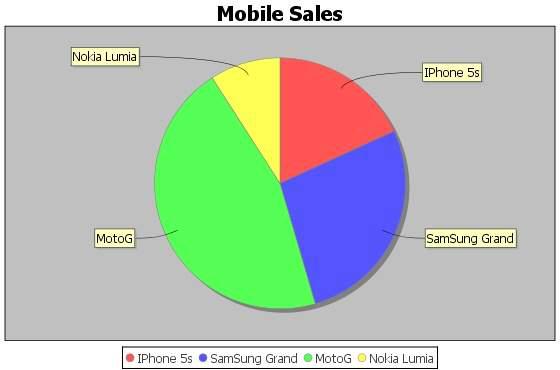
Consider we have a file named mobile.txt, having different mobile brands and their sale (units per day) separated by a simple comma (,) −
Iphone 5S, 20 Samsung Grand, 20 MOTO G, 40 Nokia Lumia, 10
Following is the code to create a Pie Chart based on the information provided in mobile.txt −
import java.io.*;
import java.util.StringTokenizer;
import org.jfree.chart.ChartUtilities;
import org.jfree.chart.ChartFactory;
import org.jfree.chart.JFreeChart;
import org.jfree.data.general.DefaultPieDataset;
public class PieChart_File {
public static void main( String[ ] args )throws Exception {
String mobilebrands[ ] = {
"IPhone 5s" ,
"SamSung Grand" ,
"MotoG" ,
"Nokia Lumia"
};
InputStream in = new FileInputStream( new File( "C:/temp/test.txt" ) );
BufferedReader reader = new BufferedReader(new InputStreamReader(in ) );
StringBuilder out = new StringBuilder();
String line;
DefaultPieDataset dataset = new DefaultPieDataset();
while (( line = reader.readLine() ) != null ) {
out.append( line );
}
StringTokenizer s = new StringTokenizer( out.toString(), "," );
int i = 0;
while( s.hasMoreTokens( ) && ( mobilebrands [i] != null ) ) {
dataset.setValue(mobilebrands[i], Double.parseDouble( s.nextToken( ) ));
i++;
}
JFreeChart chart = ChartFactory.createPieChart(
"Mobile Sales", // chart title
dataset, // data
true, // include legend
true,
false);
int width = 560; /* Width of the image */
int height = 370; /* Height of the image */
File pieChart = new File( "pie_Chart.jpeg" );
ChartUtilities.saveChartAsJPEG( pieChart, chart, width, height);
}
}
Let us keep the above Java code in PieChart_File.java file, and then compile and run it from the command prompted as −
$javac PieChart_File.java $java PieChart_File
If everything is fine, it will compile and run to create a JPEG image file named PieChart.jpeg that contains the following chart.